
Stop building gang sheets by hand
Manual layouts waste time and film on every single sheet. Gang Sheet Automator packs your DTF artwork automatically and builds print-ready gang sheets in seconds — directly on your computer. No browser. No uploads. No waiting.
<5s
Build Time
300 DPI
Print-Ready
10
Free Builds
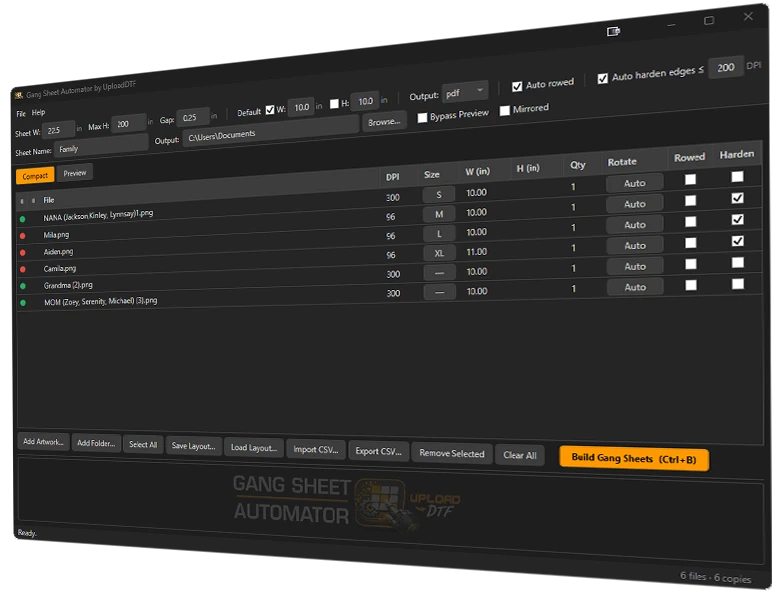
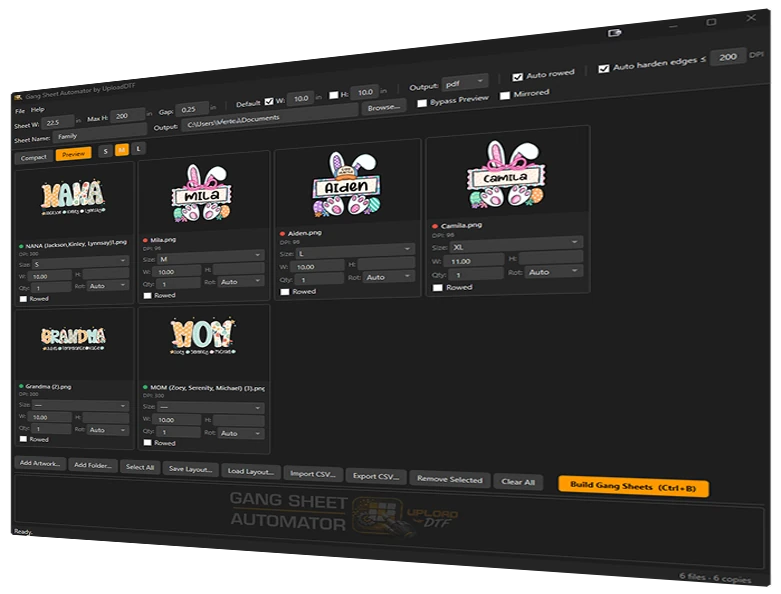
Everything you need to pack smarter, build faster
Built specifically for direct-to-film printers — every feature is engineered to save time, cut material costs, and run faster than any web-based gang sheet tool on the market.
Edge Sealer 1.0
Stray transparent pixels along artwork edges cause white outlines on your transfers. Edge Sealer automatically eliminates them on designs 200 DPI and under — crisp, clean prints without manual cleanup.
AutoTrim
Oversized canvases and invisible borders waste sheet space. AutoTrim detects and removes blank transparent area around every design before packing — so each transfer is packed at its true printed size.
SmartNest 1.0
Manual nesting leaves gaps. SmartNest runs 40 layout passes per build, testing different orderings and rotations to find the arrangement that wastes the least film — automatically, every time.
Blazing Local Speed
Tired of uploading files to slow web tools and waiting in server queues? Everything runs on your machine. Most gang sheets build in under 5 seconds. Browser-based tools can't compete.
Multi-Format Support
Stop converting files before you can use them. Import PNG, SVG, PDF, and Adobe Illustrator (.AI) artwork — all with full transparency and alpha channel support.
Auto-Rotation
Designs placed one way leave dead space. Gang Sheet Automator automatically rotates each transfer to find the most efficient fit — more transfers per roll, less film wasted.
Print-Ready Export
No more exporting and re-processing. Export as high-resolution PNG or PDF at 300 DPI — print-ready for your RIP software. PDF output is fully layered and Illustrator-ready.
CSV Import & Export
Manually entering job details wastes time. Import job lists from spreadsheets or export your current job for record keeping. Built for high-volume DTF shops.
Shirt Size Presets
Stop measuring and guessing dimensions. Select Small, Medium, Large, XL and more — the correct DTF print dimensions fill in automatically.
Customizable Gap Control
Set the exact spacing between designs so every cut is clean and easy. Wider gaps for scissors, tighter gaps to maximize transfers per sheet — you control it.
Auto Row Alignment
Stop adjusting small designs one by one. Smaller transfers snap into perfectly aligned rows so you can trim an entire row in one straight cut — no measuring.
Multi-Sheet Auto Build
When designs overflow a single sheet, Gang Sheet Automator automatically builds as many sheets as needed and numbers them sequentially. No manual splitting, no missed designs.
From files to film in 3 steps
No complicated setup. No design skills needed. Just load, configure, and build.
Add Your Artwork
Drag and drop your DTF artwork — PNG, SVG, PDF, or AI files. Set print sizes and quantities per design. Batch-add entire folders at once.
Configure Your Sheet
Set your DTF roll width, sheet height, gap spacing, and output resolution. Gang Sheet Automator handles the rest.
Build & Export
Click Build. Your print-ready gang sheet exports as PNG or PDF in seconds — ready to send straight to your RIP software.
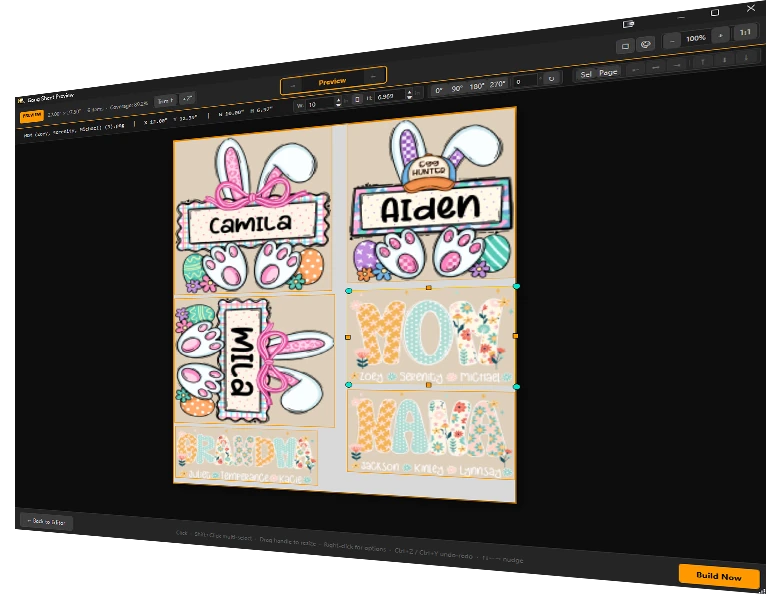
This is what a finished gang sheet looks like
Tightly packed, auto-rotated, print-ready at 300 DPI. Built in under 5 seconds.
Works with your existing files
No conversion needed. Gang Sheet Automator natively reads every major artwork format used in DTF production.
Input Formats
Export Formats
What you stop losing with Gang Sheet Automator
<5s
Build time
20+ minutes of manual dragging replaced. On every single sheet.
40
Layout passes per build
SmartNest tests 40 different arrangements to find the tightest pack.
30%+
Less wasted film
That's profit you're currently throwing in the trash on every job.
Simple, affordable plans
Start free with 10 trial builds — no account required. Upgrade when you're ready to go unlimited.
Free Trial
10 full builds. No credit card. No account required.
- 10 gang sheet builds total
- PNG import
- SVG import
- PDF / AI import
- PNG export (300 DPI)
- Layered PDF export
- SmartNest 1.0 layout engine
- Auto-rotation
- DPI quality indicator
- Layout save / load
- CSV import & export
- Email support
Pro
For shops running regular production jobs.
$164.89/year (save 1 month)
- 50 gang sheet builds/month
- PNG import
- SVG import
- PDF / AI import
- PNG export (300 DPI)
- Layered PDF export
- SmartNest 1.0 layout engine
- Auto-rotation
- DPI quality indicator
- Layout save / load
- CSV import & export
- Email support
- Priority support
- Early feature access
Unlimited
No limits. For high-volume production shops.
$274.89/year (save 1 month)
- Unlimited gang sheet builds
- PNG import
- SVG import
- PDF / AI import
- PNG export (300 DPI)
- Layered PDF export
- SmartNest 1.0 layout engine
- Auto-rotation
- DPI quality indicator
- Layout save / load
- CSV import & export
- Email support
- Priority support
- Early feature access
Windows 10/11 · 4 GB RAM · No account required for free trial
System requirements
Operating System
Windows 10 / 11 (64-bit)
Processor
Any modern 64-bit — multi-core recommended for large builds
RAM
4 GB minimum — 8 GB recommended for large artwork files
Storage
~200 MB for application + space for artwork and output
Display
1280x720 minimum — 1920x1080 or higher recommended
Internet
Required to launch — used for license verification and auto-updates